

An introduction to CSS Contains
What is css-contain?
The main objective of the standard CSS Contains It is to improve the rendering performance of web pages, enabling the isolation of a subtree astarting from the rest of the document. This specification only introduces a new CSS property called containwith different possible values. Browser mechanisms can use this information to implement optimizations and avoid doing extra work when they know which subtrees are independent of the rest of the page.
Let's explain what this is and why it can bring performance improvements to complex websites. Imagine you have a large HTML page that generates a tree. SUN It's complex, but you know that some parts of this page are completely independent of the rest of the page, and the content of those parts is modified at some point.
Browser mechanisms generally try to avoid more work than necessary and use some heuristics to avoid spending more time than needed. However, there are many corner cases and complex situations where the browser actually needs to recompile the entire web page. To improve these scenarios, the author should identify which parts (subtrees) of their website are independent and isolate them from the rest of the page, thanks to... containproperty. So, when there are changes to some of these sub-items, the rendering engine will be able to avoid any work outside the boundaries of the subtree.
Not everything is free when you use it., containThere are some restrictions that affect these elements, so the browser is perfectly certain that it can apply optimizations without causing any breakage (for example, you need to manually set the element size if you want to use it). size containment ).
The CSS Containment specification defines four values for the containproperty, one for each type of containment :
layoutThe element's internal layout is completely isolated from the rest of the page, is not affected by anything external, and its content cannot have any effect on its ancestors.paintDescendants of the element cannot be displayed outside its boundaries; nothing will overflow this element (or if it is not visible).sizeThe element's size can be calculated without checking its children; the element's dimensions are independent of its content.styleThe effects of accountants e quotation marks They cannot escape this element, so they are isolated from the rest of the page.
Note that, with regard to stylistic restraint, there is a Ongoing discussion on the CSS Working Group Regarding its usefulness (due to the narrower scope of counters and quotes).
You can combine the different containment types however you like, but the specification also provides two extra values that are a sort of "shortcut" for the other four:
contentWhat is equivalent tocontain: layout paint style.strictThis is the same as having all four types of containment, so it's equivalent tocontain: layout paint size style.
Example
We'll show you an example How CSS contention can help improve the performance of a web page.
Imagine a page with many elements, in this case, 10,000 elements like this:
  <div class=""item"">
    <div>Lorem ipsum...</div>
  </div>
And this modifies the content of one of the internal DIVs through the textContentattribute.
If you don't use css-contain, even when the change is in a single element, Chromium spends a lot of time on the layout because it traverses the entire DOM tree (which, in this case, is large, as it has 10,000 elements).
 Example DOM Tree for CSS Contention
This is when the containProperty comes to the rescue. In this example, the DIV itemIt has a fixed size, and the content we are changing in the inner DIV will never overflow it. Therefore, we can apply... contain: strictto the item, In this way, the browser will not need to visit the rest of the nodes when something changes within a node. item, He can stop checking things in that area and avoid going outside.
Note that if the contents burst, itemIt will be cut, and if we don't define a fixed size for the itemThe text will be rendered as an empty box, so nothing will be visible (actually, in this example, the borders will be present, but they would be the only thing visible).
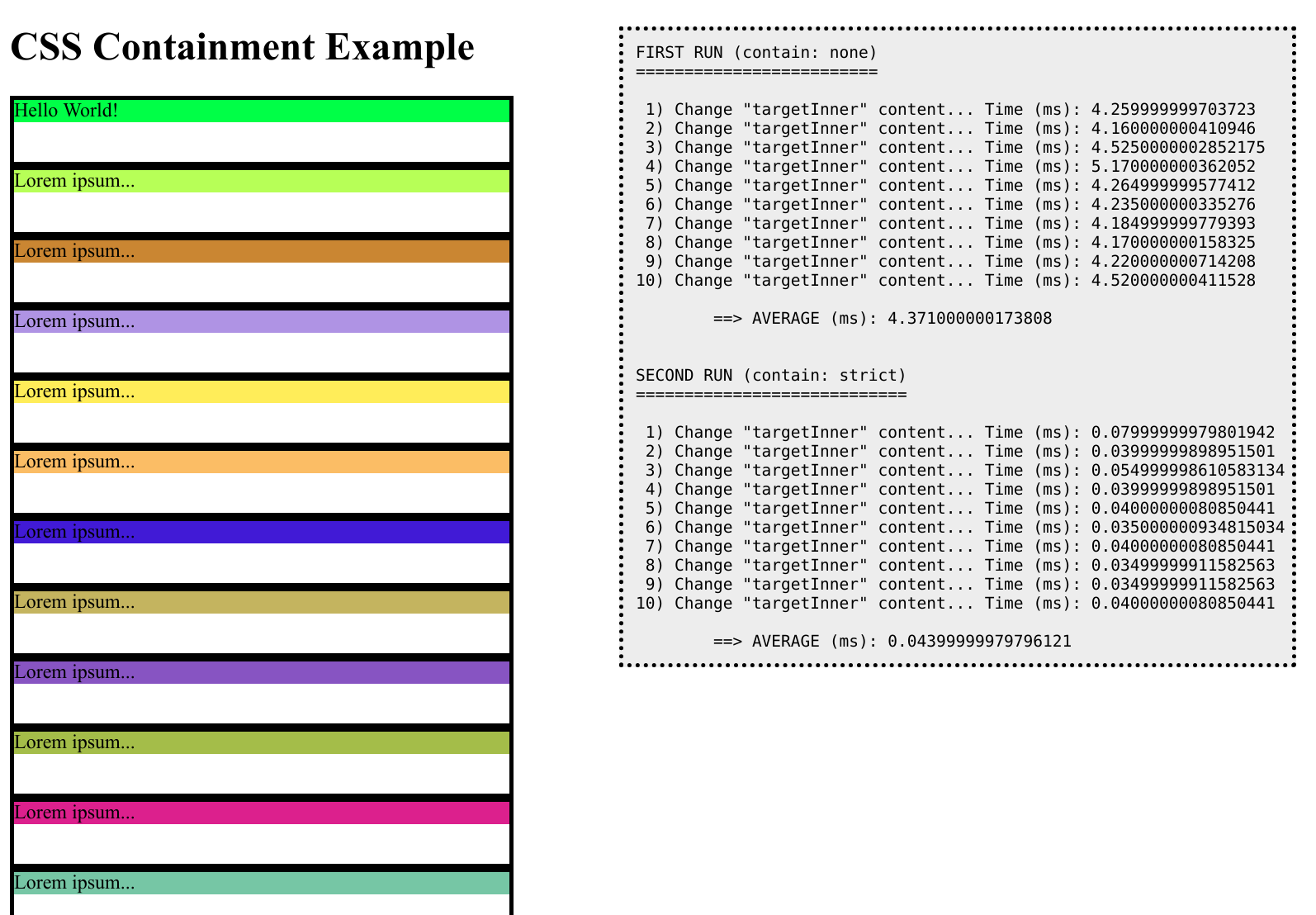 Example of CSS Containment
Despite how simple each of the items is in this example, we are achieving a significant improvement by using CSS Containment in layout time going from ~4ms to ~0.04ms, the That's a big difference. Imagine what would happen if the DOM tree had very complex structures and content, but only a small part of the page was modified; if you could isolate that from the rest of the page, you could obtain similar benefits.
State of the art
This is not a new specification, the Chrome 52 sent initial support until July 2016. , However, during the past year there has been some additional development related to it, and that's what I want to highlight in this blog post.
In the first place, Many specification problems have been corrected. and some of them involve changes in the implementations, most of this work was done by Florian Rivoal in collaboration with CSS Working Group .
Not only that, but on the testing side, Gérard Talbot completed test suite in the web platform test repository (WPT) , which is really important for correcting errors in implementations and ensuring interoperability.
In my case , I have been working on implementing Chromium. Correcting various bugs and interoperability issues and updating them according to the latest specification changes. I leveraged the WPT test suite to do this work and also contributed a lot of tests there. I also I imported the tests from Firefox. I'm using Chromium to improve interoperability (I even made a small patch for Firefox as part of this work).
Finally, it is worth noting that the Firefox has been actively working on implementing css-contain during the past year (you can test it by enabling the runtime flag) layout.css.contain.enabledI hope this will lead to a second navigation mechanism for submitting specifications in the future.
Wrap
CSS Containment is a simple and nice specification that can be useful for improving web rendering performance in many different use cases. It's true that currently it's only supported by Chromium (remember that Firefox is also working on it) and that... more improvements and optimizations They can be implemented based on it, yet it seems to have enormous potential.
Once again, all the work of Igalia related to css-contain was sponsored by Bloomberg as part of our ongoing collaboration.
Bloomberg has some complex UIs that are leveraging css-contain to improve rendering performance; in future blog posts, we'll discuss some of these cases and the optimizations that have been implemented in the rendering engine to improve them.


